
GrantEd Banking Overview
GrantEd is the online financial management and banking system used by all Voluntary Student Organizations (VSOs) at Stanford. Through GrantEd, your organization can submit and track a variety of financial transactions, known as “requests.”
These include:
Reimbursements for students or non-students who made purchases on behalf of the group
Payments to companies or vendors for invoices
Co-sponsorship transfers to other student groups
And more
Each of these actions is processed through GrantEd as a request.
For example, if a student buys supplies for an event and submits their receipts to be reimbursed, that submission is called a Reimbursement Request.
The General Workflow
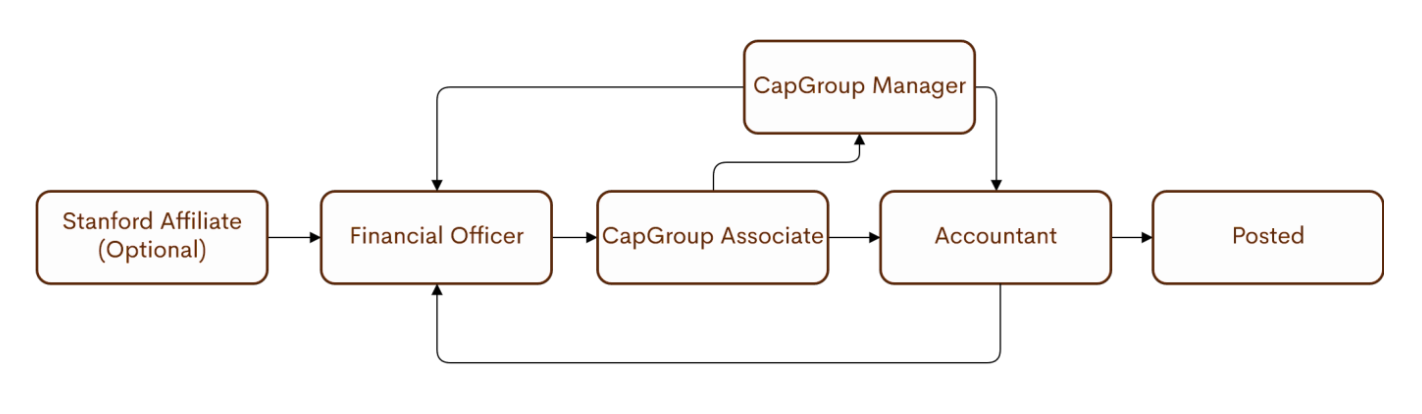
The GrantEd approval process involves several review stages to ensure accuracy and compliance. Below is an overview of how a request moves through the system:
Request Creation
Any Stanford student can create a reimbursement request for themselves using the Stanford Affiliate role in GrantEd.
Alternatively, the group’s Financial Officer (FO) can create requests on behalf of other students or submit requests for other transaction types (e.g., invoices, transfers).
Financial Officer (FO) Review
The FO reviews all requests (either those submitted by affiliates or created by themselves) for accuracy and completeness.
Once ready, the FO submits the request to the Capital Group Associate queue for review.
Depending on the amount requested or if the Financial Officer is submitting a reimbursement for themselves, the group’s President may also be required to review and approve the request after the FO’s submission.
Capital Group Associate Review
Associates verify that all required documentation (such as receipts, invoices, or funding source details) is correct.
The associate will either approve the request or mark it for review if any issues are found.
Capital Group Manager Review (if needed)
If a request requires additional clarification, it moves to the Manager queue.
Managers review the request in detail to determine whether it can move forward or must be returned to the FO for correction.
Accountant Final Review
Once approved by the associate or manager, the request moves to the Accountant queue.
Accountants perform a final check before approving payment or returning the request to the FO if any final changes are needed.
Tracking and Managing Requests
If a request is returned, a comment will be attached explaining what needs to be corrected.
These comments can be viewed directly within GrantEd.The FO must make the necessary changes before resubmitting.
To check the status of any request, FOs can view its progress in GrantEd at any time.
If a request needs to be modified or canceled, the FO can click the yellow “Withdraw” button in the top right corner of the request screen.