Uber
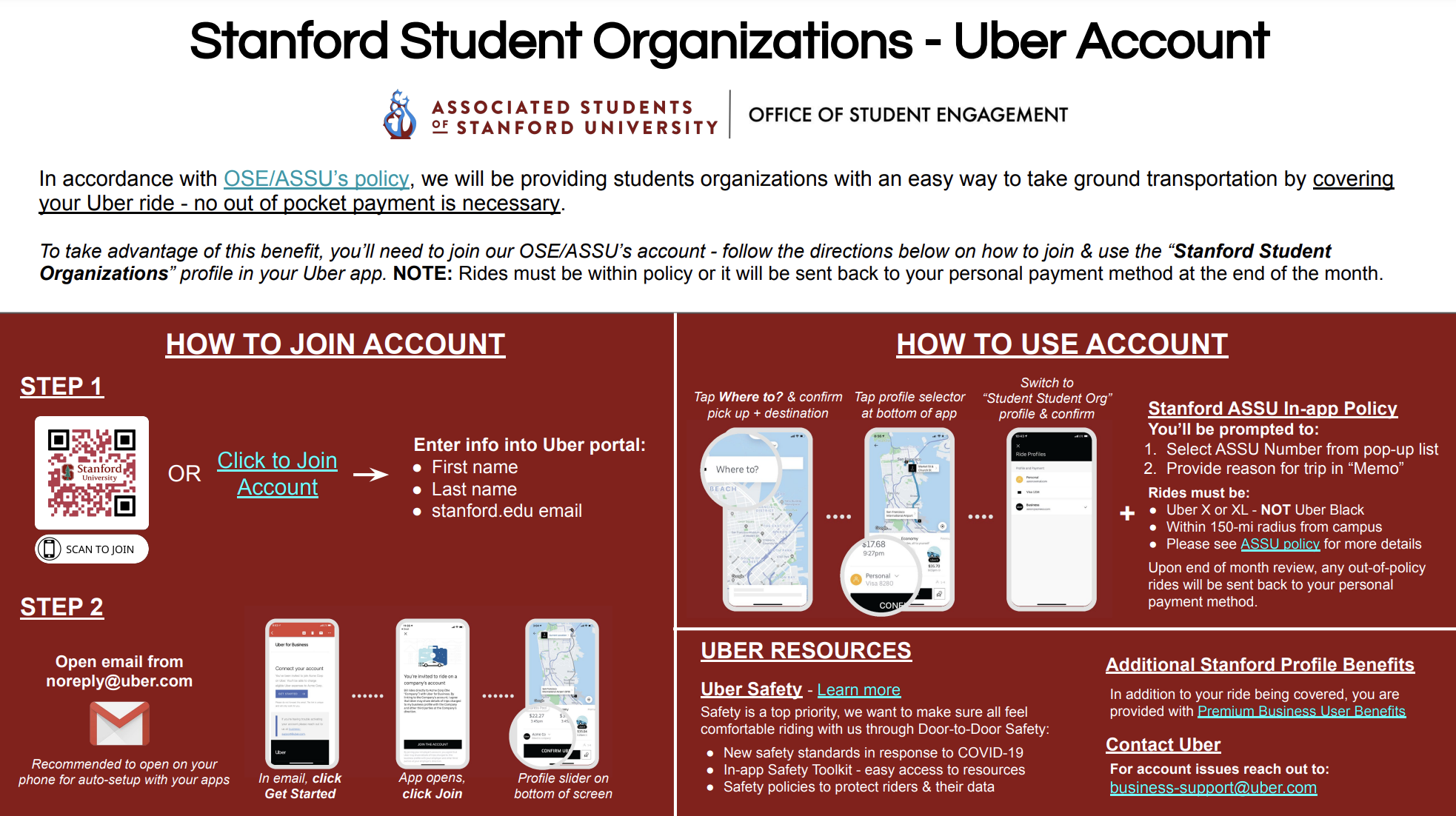
Stanford partnered with Uber to simplify transportation for VSO activities! Through this program, all VSO members can conveniently charge eligible rides directly to the VSO account, eliminating the need for personal reimbursement. This program is open to all members, streamlining the process so that transportation is easier and more efficient for everyone involved.
Please note: transportation is only eligible for events/purposes already approved by ASSU and cannot be used for purposes outside of those previously approved.
1. Sign-Up Process:
- Download the Uber guide and follow the instructions to add members to the portal.
2. Billing: Once enrolled, rides taken for the VSO will be billed directly to your ASSU account.
3. Using the Uber App:
- Open your existing Uber app and switch to the “Stanford Student Organization” account profile.
- This will automatically create an OSE/ASSU profile in your Uber app.
- Toggle between your personal and OSE/ASSU profiles as needed.
4. Existing Uber Accounts:
- Do not create a new Uber account if you already have one.
- Non-Stanford personal emails can be linked to the program, with the OSE/ASSU profile attaching to your existing account.
5. New Uber Accounts:
- If you don’t have an Uber account, create one to join the “Stanford Student Organizations” account.
Create one here.